 dbHydrate
01
SOURCE / READ ONLYDevelopment
app.orders+ status varchar(32)+ idx_orders_statusPOSTGRESQLSelected stage
COMPARE. REHEARSE. HYDRATE.
Compare schemas, review the plan, and refresh environments with selected, masked data.
id bigintfirst_name varchar(80)email varchar(255)+ phone varchar(32)Inspect the plan before applying.ALTER TABLE public.customersADD COLUMN phone varchar(32);CREATE INDEX idx_customers_emailON public.customers (email);
id bigintfirst_name varchar(80)email varchar(255)phone varchar(32)THE COMPLETE WORKFLOW
From choosing connections to a recorded change. Watch the workflow, or explore each step at your own pace.
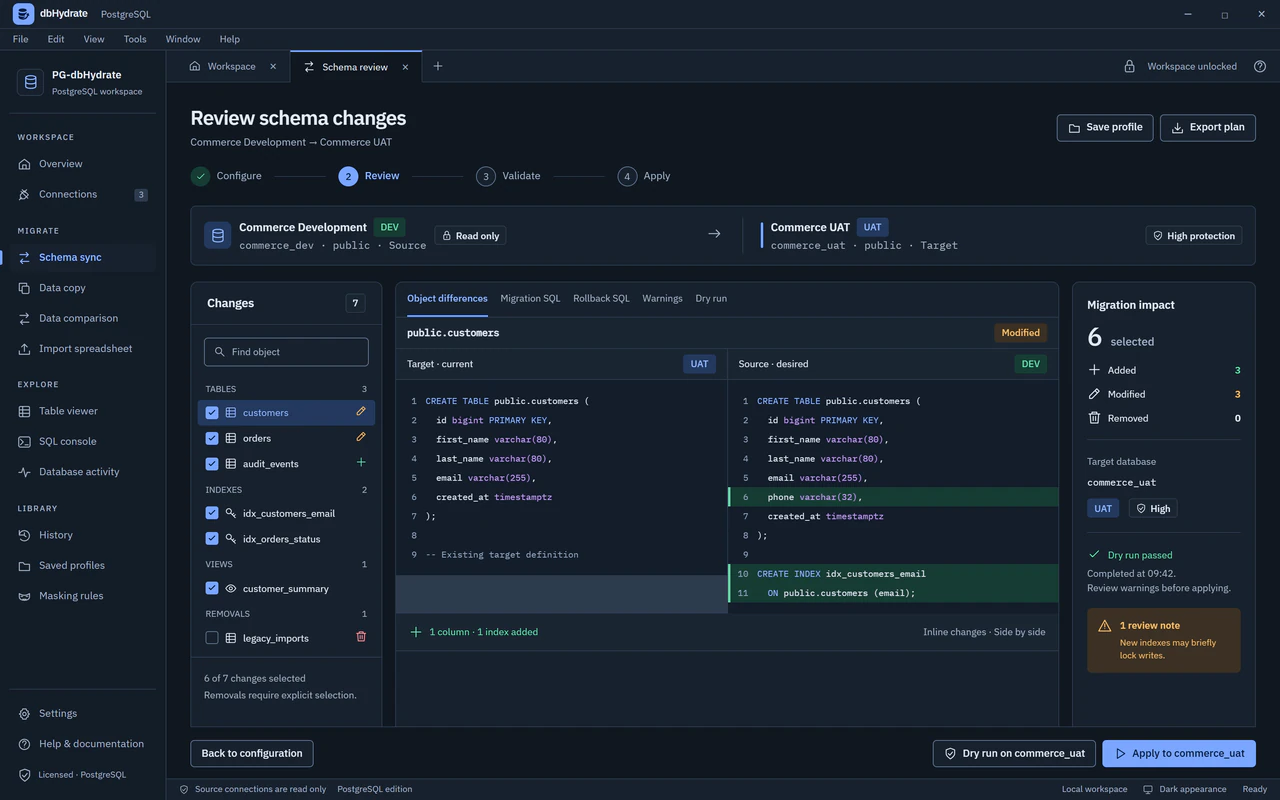
Commerce Development Commerce UAT
publicpublicInspect schema differences and generated SQL before making a change.
Start with a saved development connection. Source sessions are read only.
PRODUCT AVAILABILITY
Check again shortly for current products and download options.
Check download availabilityInspect differences and generated SQL.
Test the plan with an engine-specific dry run.
Database work runs on your computer.
ONE WORKSPACE. THE WHOLE PICTURE.
Move from schema review to selected data, queries and inspection without losing your source and target context.
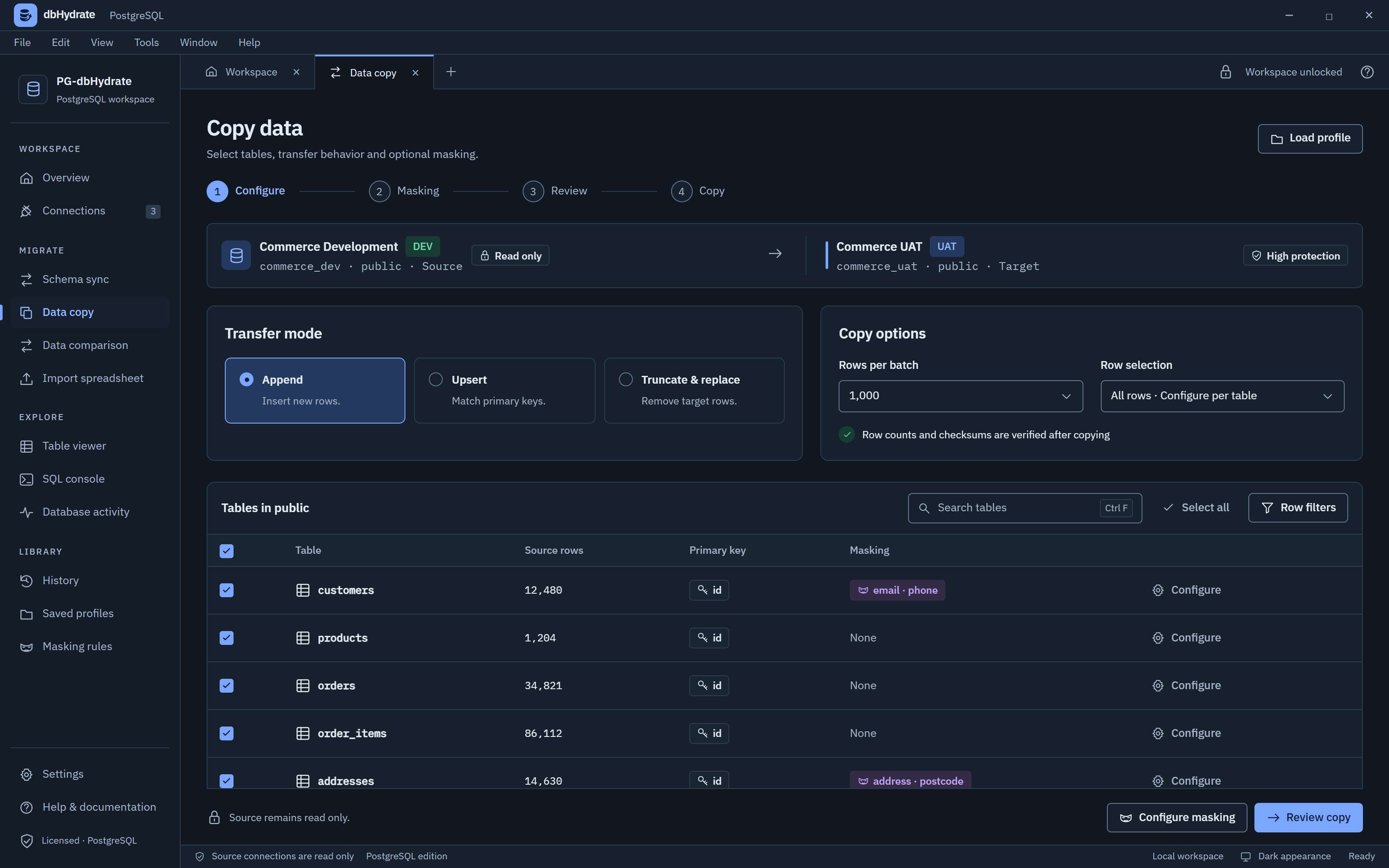
Choose your tables, filter your rows, and include their relationships.
1ALTER TABLE app.orders2 ADD COLUMN status varchar(32)3 NOT NULL DEFAULT 'pending';Explore how schema changes and test data move between local and production environments—with review at the center.
Compare a source schema, review the SQL, then confirm the protected target.
app.orders+ status varchar(32)+ idx_orders_status2 selected changesDependencies orderedReview before applyDry run requiredSnapshot requiredConfirm database nameConnect two databases of the same engine. Compare the current schemas and select the objects that belong in this change.
TWO DIRECTIONS. ONE CONSIDERED PROCESS.
Choose the workflow for the job. Source and target use the same database engine.
Compare a baseline with your target. Inspect the plan and resolve unexpected drift through review.
Explore schema drift detection 02 / TEST DATA REFRESHChoose the useful rows, include required relations, and review masked values before copying.
Explore selected data refreshSchema comparison, selected data, reusable masking, local history, user administration and CLI workflows. Review engine support and limitations before choosing.
Compare capabilitiesBEFORE YOUR NEXT CHANGE
No products are currently published. Check the trial page for availability.
No products are currently available for purchase.
Yes. Copy whole tables, test a WHERE condition, select primary-key rows, or apply a row limit. Include related rows, review masking rules, and use fixed column overrides for environment-specific values. Row limits are not a guarantee of a representative random sample.
The reusable masking dictionary supports wildcard column patterns, categories, enabled/disabled rules, deterministic seeds, and a live playground. Rules include Faker replacements, salted hashes, regex replacements, fixed strings, and NULL. Column overrides run after masking, so review final values. Presets are configuration aids, not compliance certification.
Inspect recorded SQL and run results, then compare source and target schemas again. The current documented scope does not promise automated row-by-row reconciliation or checksum verification; those are development opportunities.
The application uses a persistent local data location for saved connections, settings, and history, with migration of legacy configuration during upgrades. Light, Dark, or System appearance preferences are saved. Database and schema discovery also keeps a manual-entry fallback.
No products are currently published. Check the trial page for availability.
dbhydrate synchronizes environments of the same engine: PostgreSQL to PostgreSQL, or MySQL to MySQL. It does not convert schemas or data between database engines.
Every run opens Review & Confirm with the change list and generated SQL. High-protection targets require a passing dry run, a pre-apply snapshot, and a typed database-name confirmation. The target schema is checked again before execution; if it has changed, you must compare again.
PostgreSQL changes in the transactional phase roll back automatically on failure; some operations run in a separate phase. MySQL DDL commits one statement at a time and cannot roll back automatically. dbhydrate records applied steps and generates rollback SQL for review. Schema rollback scripts do not reverse copied data; restoring data requires an appropriate data export.
When copying from a higher-protection source to a lower-protection target, every copied column needs an approved masking rule or an explicit “Not PII” decision. Values are transformed in memory before writing to the target. Detection uses column names and local samples, with no AI service.
App state stays in local files on your computer. Saved database passwords and SSH secrets are encrypted with AES-256-GCM, protected by your master password. Run history records the exact SQL and results without credentials. Database connections still communicate directly with your chosen servers.